


You cannot directly remove yourself from someone’s Close Friends list — only the account owner can do that. However, you have three practical options: mute their stories (invisible to them, takes 10 seconds), unfollow them entirely, or ask them directly to remove you. This guide covers all three methods with exact steps, plus what happens to each party when you use them.
What Is Instagram Close Friends? (Quick Overview)
| Feature | How It Works |
|---|---|
| What it is | A private story that only people on your Close Friends list can see |
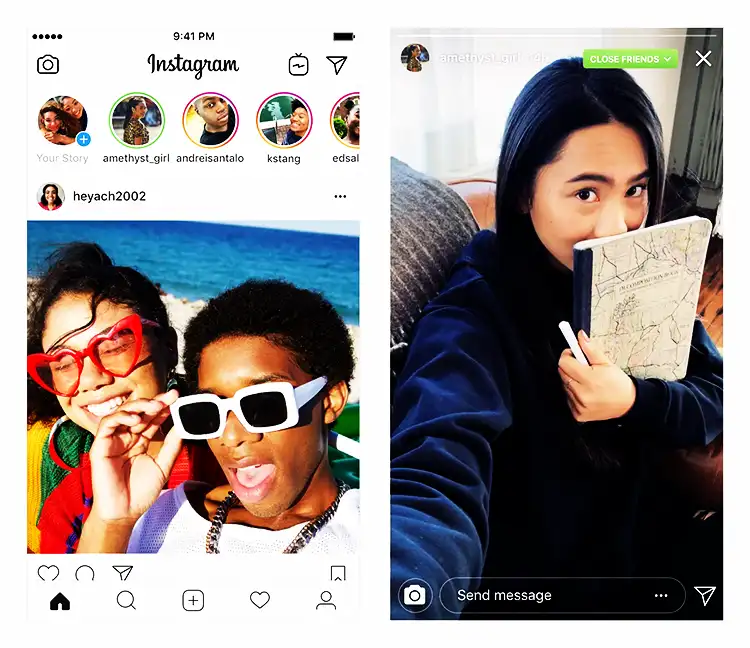
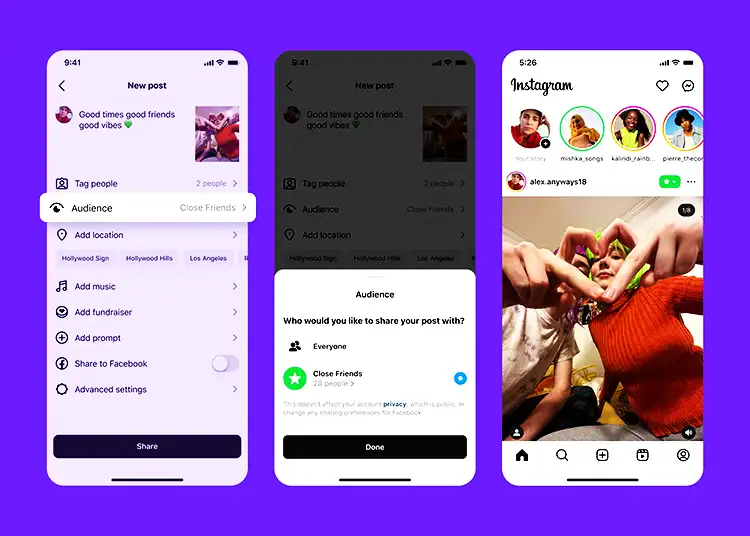
| Visual indicator | Green ring around the profile picture (instead of the normal pink/purple gradient) |
| Who controls the list | Only the account owner — followers cannot add or remove themselves |
| Notifications when added | No — people are not notified when added to Close Friends |
| Notifications when removed | No — people are not notified when removed either |
| Can you see who else is on the list | No — only the account owner can see their full Close Friends list |
All Methods to Leave or Stop Seeing Close Friends Stories
| Method | How It Works | Will They Know? | Still Following After? | Best For |
|---|---|---|---|---|
| Mute Stories | Hides all their stories (including Close Friends) from your feed | No — completely silent | Yes | You want to stop seeing their stories without any drama or change in the relationship |
| Unfollow | Removes all their content from your feed permanently | No notification, but they may notice | No | You no longer want any content from them in your feed |
| Ask to be removed | Direct DM requesting the person to remove you from their Close Friends list | Yes — it requires direct conversation | Yes | You have a close relationship and want to handle it respectfully and directly |
| Restrict the account | Limits their interaction with you — they can still see your stories but effects are limited | No notification sent | Yes | You want to reduce their access to your account alongside managing what you see |
Method 1: Mute Their Close Friends Stories (Recommended)
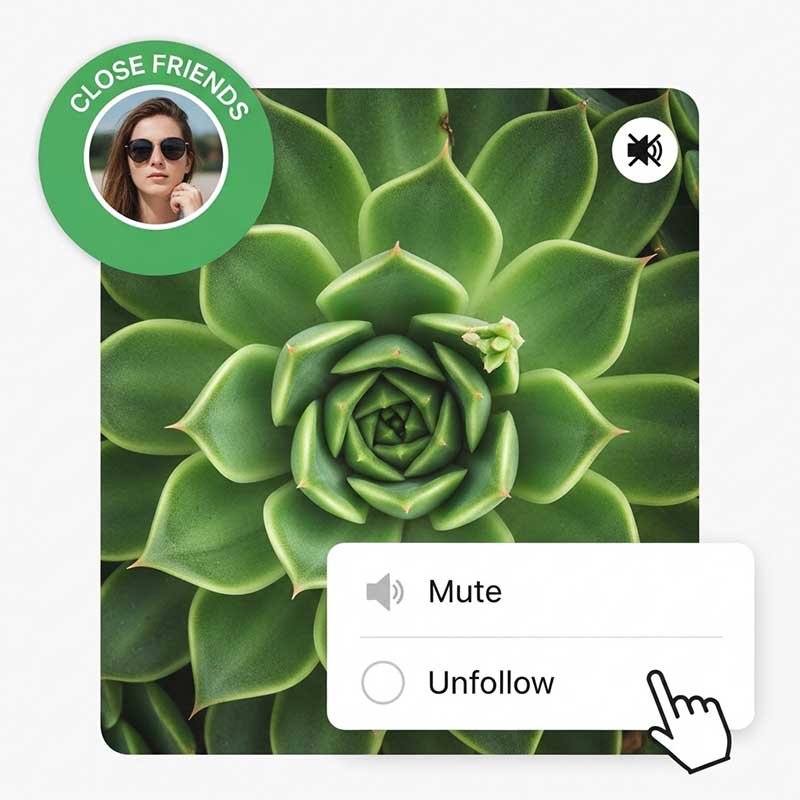
Muting is the cleanest solution. The person never knows, you stay connected, and their stories simply stop appearing in your feed. This is the method to use in almost every situation.
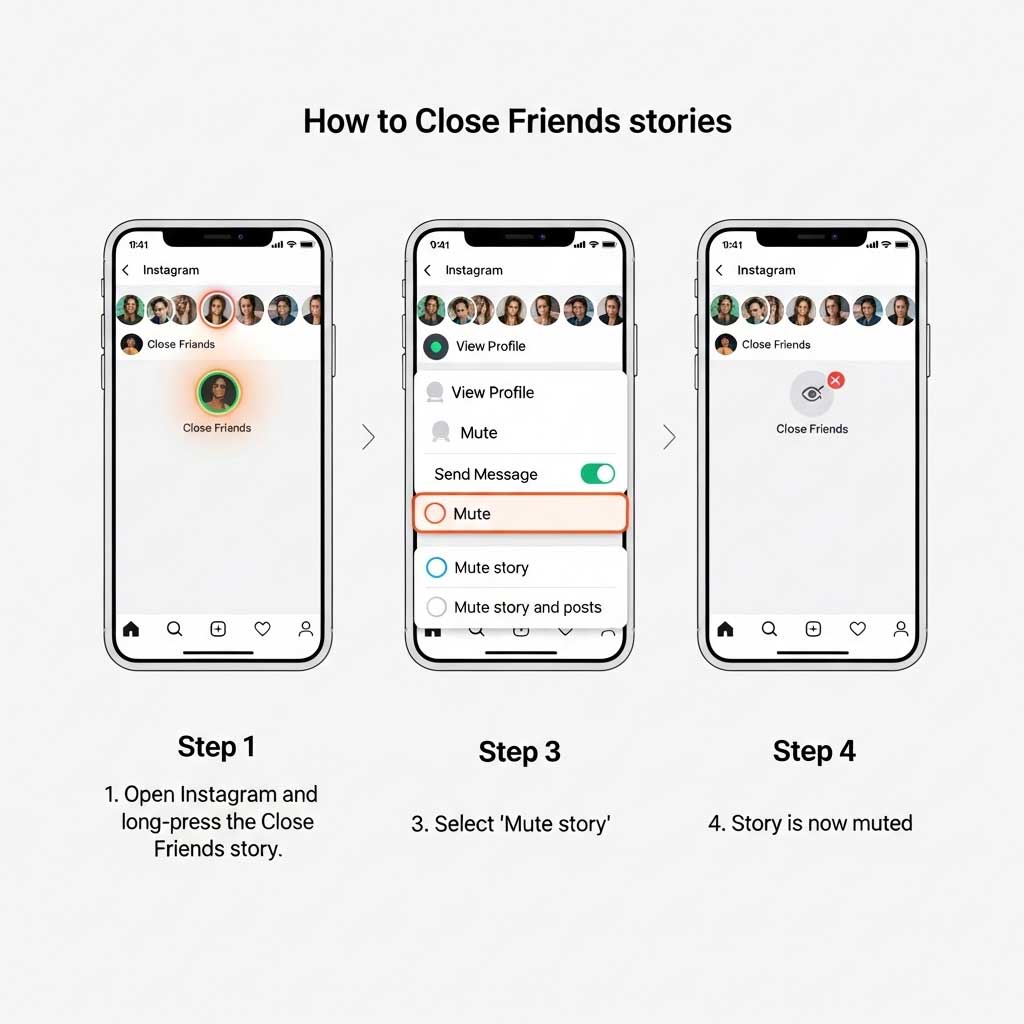
- Open Instagram and go to your story feed (the row of circles at the top)
- Find the person’s Close Friends story — it has a green ring
- Long-press (tap and hold for 1–2 seconds) on their profile picture
- Tap Mute in the menu that appears
- Select Mute Story — or Mute Story and Posts if you want to hide everything
- Their stories (including Close Friends) will no longer appear at the top of your feed
| What Changes After Muting | What Stays the Same |
|---|---|
| Their stories no longer appear in your feed | You are still following them |
| Their Close Friends stories are hidden from you | You can still visit their profile and see public posts |
| They receive zero notification | You still appear in their follower count |
| Their posts are hidden (if you chose “Mute Story and Posts”) | You can unmute anytime by long-pressing their profile again |
Method 2: Unfollow the Account
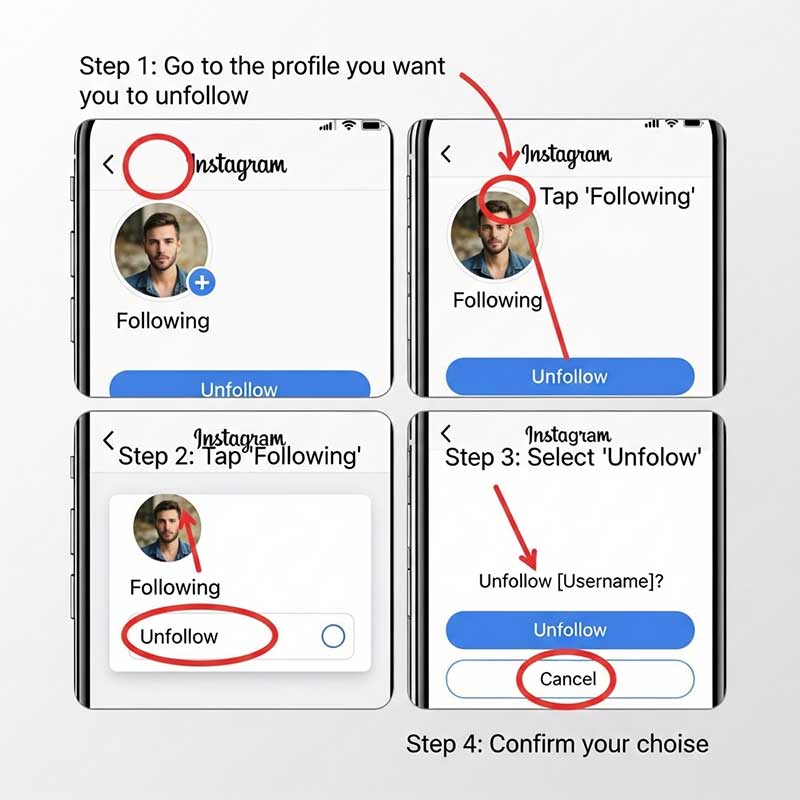
Unfollowing is more permanent than muting. Once you unfollow, you stop seeing all their content — including Close Friends stories. Use this when you genuinely want to disconnect from the account entirely.
- Go to the person’s profile
- Tap the Following button (blue button next to their username)
- Select Unfollow in the confirmation menu
- You will no longer see any of their content in your feed, including Close Friends stories
Important distinction: Unfollowing does not block the person. They can still see your profile and stories (unless your account is private). They also won’t receive a notification that you unfollowed, but they may notice if they check their follower count or look at their story viewers.
Method 3: Ask to Be Removed from Close Friends
This is the only method that actually gets you removed from the list rather than just hiding their content from you. It requires a direct conversation, which makes it the right choice only in certain situations:
| When to Ask Directly | When to Just Mute Instead |
|---|---|
| You’re close enough that an honest conversation won’t be awkward | You’d rather avoid the conversation entirely |
| The person shares sensitive content you find genuinely uncomfortable | You just don’t find their content interesting anymore |
| You want to set a clear boundary they should know about | A mute accomplishes the same goal without social risk |
| They’re sharing content about you or your mutual connections | The content is just irrelevant to your current interests |
Example DM you can send:
“Hey! I appreciate you including me in your Close Friends — it means a lot. I’m trying to step back from Instagram a bit right now, so would you mind removing me from your Close Friends list? No big deal either way, just wanted to be upfront about it!”
Why You Might Want to Leave a Close Friends List
| Reason | Best Solution |
|---|---|
| You’re no longer close with the person | Mute — handles it silently, preserves the follow |
| Their content causes stress or anxiety | Mute — immediate and private |
| You had a falling out or breakup | Unfollow or Mute — creates necessary distance |
| Too many Close Friends lists cluttering your feed | Mute the less important ones, keep the meaningful ones |
| You want to reduce overall social media use | Mute multiple accounts to reduce feed noise |
| The content is sensitive and genuinely uncomfortable | Ask to be removed directly |
What Happens After You Mute, Unfollow, or Ask to Be Removed?
| Action | What You See | What They See | Notification Sent? | Reversible? |
|---|---|---|---|---|
| Mute Stories | Their stories no longer appear in your feed | Nothing changes on their end | No | Yes — unmute anytime |
| Mute Posts + Stories | All their content disappears from your feed | Nothing changes on their end | No | Yes — unmute anytime |
| Unfollow | All their content gone from your feed | Follower count drops; they may notice | No notification, but detectable | Yes — re-follow anytime |
| Ask to be removed | No more green ring stories from them | They know via your message | Yes (it’s a direct conversation) | Yes — they can re-add you |
How to Manage Your Own Close Friends List

If you’re on the other side of this — someone has asked to be removed from your Close Friends list, or you want to review and update your list:
- Go to your Instagram profile
- Tap the three-line menu (top right)
- Select Close Friends
- To remove someone: tap their name to deselect them (checkmark disappears)
- To add someone: search their name and tap to add the checkmark
- Tap Done to save changes
Key reminders:
- Only you can see your Close Friends list — it’s completely private
- People are not notified when you add or remove them
- You can update your list as often as you want
- The list applies globally — if you add someone, they see all your Close Friends stories, not just some
Common Scenarios: Which Method Should You Use?
| Your Situation | Recommended Method | Why |
|---|---|---|
| You drifted apart from a friend and their daily updates feel awkward | Mute Stories | Silent, reversible, no social risk |
| Your feed is too cluttered with Close Friends content from too many people | Mute the least relevant ones | Declutters without burning bridges |
| You’re going through something and need a social media break | Mute Stories or take a broader app break | Temporary and fully reversible |
| You had a falling out and can’t stand seeing their content | Mute or Unfollow | Immediate distance; mute is quieter, unfollow is more complete |
| The content being shared is genuinely inappropriate or makes you uncomfortable | Ask to be removed directly | A clear boundary is appropriate here |
| You simply don’t enjoy their content anymore | Mute | No need to escalate when a quiet mute solves it |

FAQ: Leaving a Close Friends Story on Instagram
Can I remove myself from someone’s Instagram Close Friends list?
No — you cannot directly remove yourself from someone’s Close Friends list. Only the account owner controls who is on their list. Instagram does not give followers any tool to opt out of a Close Friends list by themselves. Your three options are: (1) mute their stories so you don’t see the content even though you’re still on the list; (2) unfollow the account entirely so you see none of their content; or (3) send them a polite DM asking them to remove you. In most situations, muting is the easiest and most discreet solution.
Will the person know if I mute their Close Friends stories?
No. Instagram does not notify users when someone mutes their stories. The person whose stories you mute has no way to see that you’ve done it — your name simply stops appearing in their story viewers because you’re no longer watching. You remain in their follower count, you still appear on their Close Friends list, and nothing changes on their end. Muting is entirely private and reversible — you can unmute at any time by long-pressing their profile picture and selecting “Unmute.”
What is the difference between muting and unfollowing on Instagram?
Muting hides a specific account’s stories and/or posts from your feed, but you remain their follower. The relationship on Instagram stays intact — they’re still following you if they do, you’re still in their followers count, and you can still see their profile directly by searching for it. Unfollowing, on the other hand, severs the follow relationship entirely. Their content is completely removed from your feed, and your follower count on their profile drops by one. Muting is quiet and reversible; unfollowing is more visible (they may notice) but also reversible.
Can I see someone’s Close Friends stories if I’m not on their list?
No. Close Friends stories are completely private — only people the account owner has added to their Close Friends list can see them. You cannot access a Close Friends story by visiting someone’s profile directly, and there’s no workaround. If you can see their regular public stories but not a green-ringed one, it simply means you’re not on their Close Friends list. This is by design — the entire purpose of the feature is to share selectively.
How do I manage my own Instagram Close Friends list?
Go to your profile → tap the three-line menu (top right) → select “Close Friends.” From here, you can search for people to add, or tap existing members to remove them. Changes take effect immediately. Nobody is notified when added or removed. Your list is completely private — even the people on your Close Friends list cannot see who else is on it. You can access and update your Close Friends list at any time, and there’s no limit to how many people you can add.
What happens if I ask someone to remove me from their Close Friends list?
If you send a DM asking to be removed, the outcome depends entirely on the other person — they may remove you promptly, they may feel hurt or confused, or they may take time to respond. If they do remove you, you’ll stop seeing their green-ring stories, but you’ll continue to see their regular public stories as normal. If they don’t remove you, you haven’t lost anything — you can still mute their stories as a fallback. Asking directly is only worth it if the content is genuinely problematic or if you have a close enough relationship that honesty is appropriate.
Can I rejoin someone’s Close Friends list after I’ve been removed?
You can only rejoin if the account owner chooses to add you back — you have no control over this. If you were removed because you asked to be removed (via a DM), and later you change your mind, you’d need to let the person know you’re open to being added again. If you were removed without knowing why, there’s no way to request re-addition directly through Instagram. The account owner’s Close Friends list is entirely under their control.
Related Articles
| Article | Why It’s Relevant |
|---|---|
| Can Someone See Your Highlights If You Hide Your Story? | Related guide on controlling who sees your story content |
| Why Would Someone Hide Their Instagram Story From You | The flip side — when someone hides their story from you specifically |
| If You Block Someone After Viewing Their Story | What happens with story visibility when you block someone |
| Why Would a Girl Hide Her Story From Me | Understanding story hiding behavior in social contexts |
| How to Tell If Someone Blocked You From Seeing Their Story | Distinguish between being hidden from stories vs. being blocked |
| Navigation on Instagram Story | Understanding Instagram Story analytics and visibility tracking |